Sunpitch: Solar Panel Planner
See the shade behind your solar estimate
Sun path · Yield by hour · Site comparison
/ Screenshots
/ About Sunpitch: Solar Panel Planner
Sunpitch is a solar panel planner for balconies and roofs. Enter the place, add the house opposite or the slab above, and read the estimated yearly, monthly and hourly output in kWh. It works as a solar panel calculator that shows where and when the shade falls.
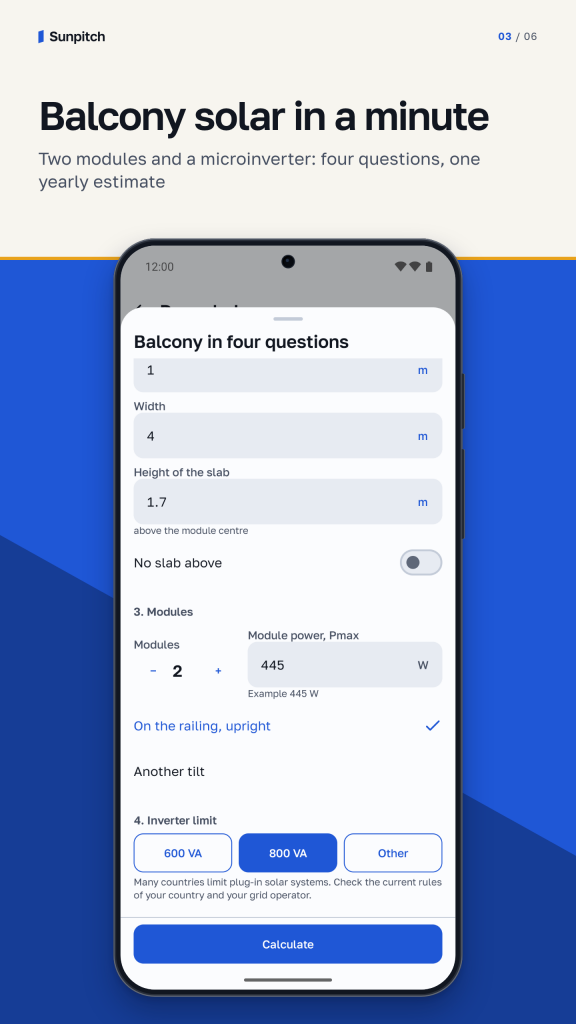
Balcony solar in four questions
Which way does the railing face? What stands above and opposite? How many modules, and how many watts each? What is the inverter limit in VA? These inputs are enough for a first balcony solar estimate. Presets for 600 and 800 VA are one tap, the limit itself is yours to enter. You get a yearly estimate, a day profile and the part of the yield the inverter limit cuts off.
Sun path and shading
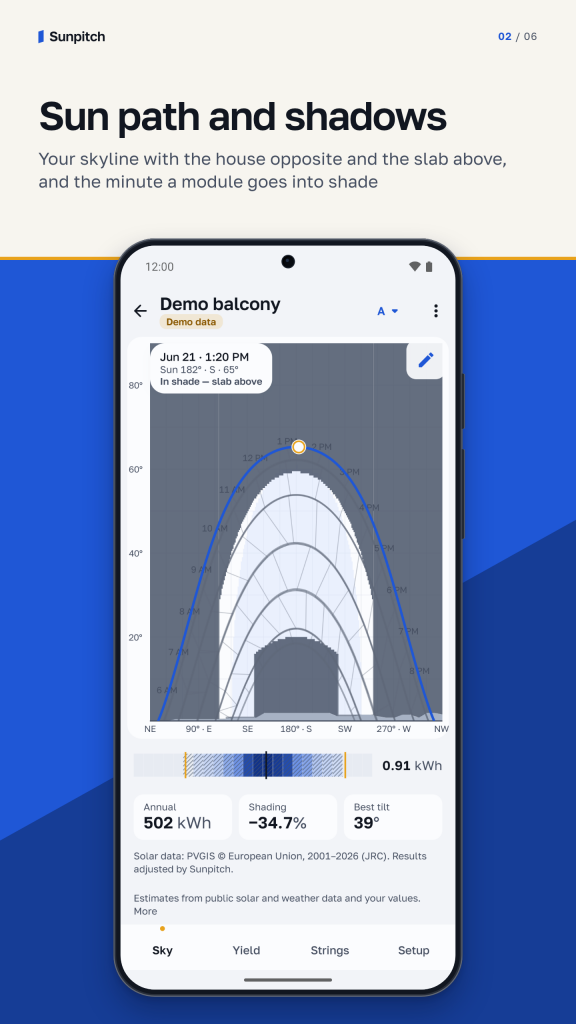
The sun path chart draws the Sun's arc for every month over your skyline. Terrain comes from public data. Add a recess, a slab or overhang, the house opposite, a tree or a chimney: pick a template, draw with a finger, sight the edges with the phone's motion sensors or enter a table. Scrub through the day and see the minute a module goes into shade.
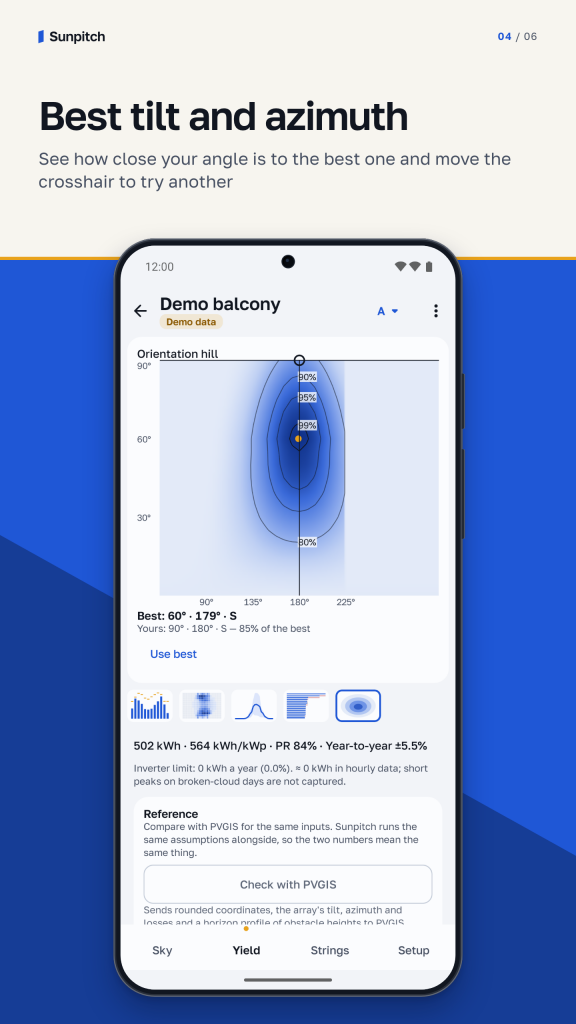
Best tilt and azimuth
A map of tilt against azimuth shows how your panel orientation compares with the estimated optimum for the year, winter or daytime load. Drag the crosshair to try an angle, or apply the best one with a tap.
Yield by hour, month and year
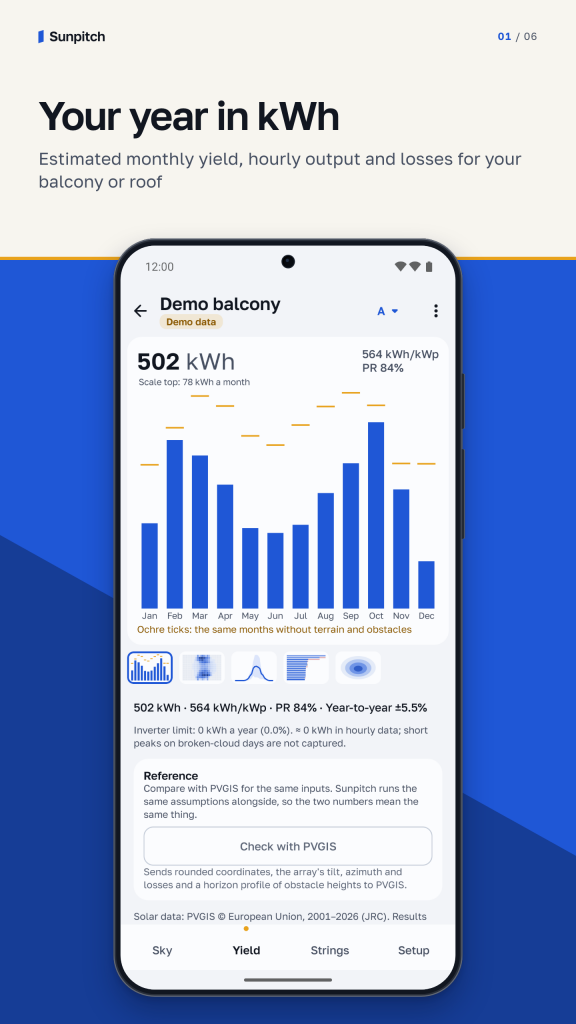
As a solar panel calculator, Sunpitch gives monthly bars, a day profile, a heat map of the whole year, a waterfall of losses (shade, temperature, soiling, mismatch, cable, inverter limit), performance ratio and the share of every array.
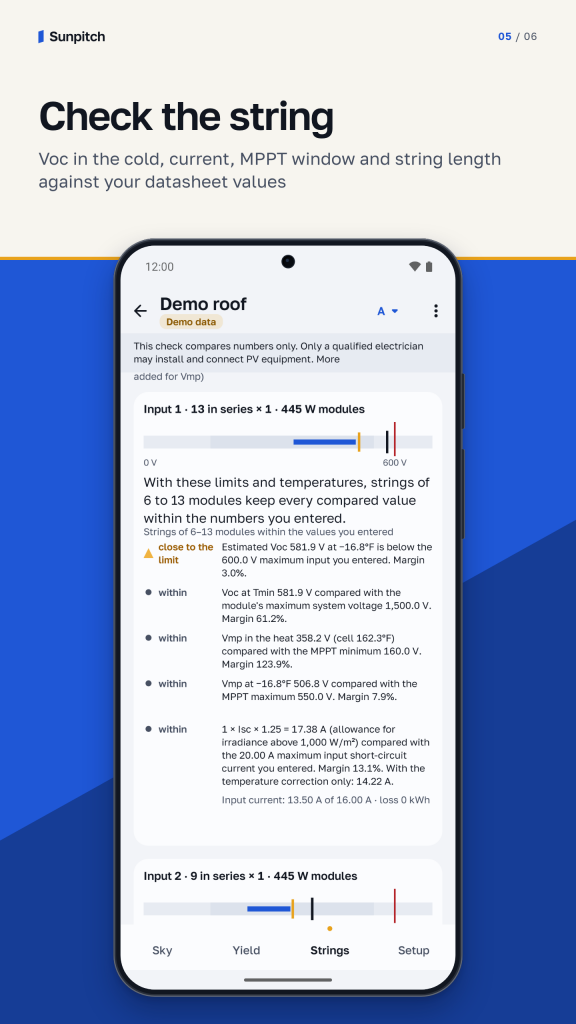
Check the string
For roof arrays and string inverters: Voc at the coldest temperature of your place against the inverter input and system voltage, current, the MPPT window, and the string length range for your entered values. Every line says whether the estimate is inside the numbers you entered. The check compares numbers only; installing and connecting equipment is for a qualified electrician.
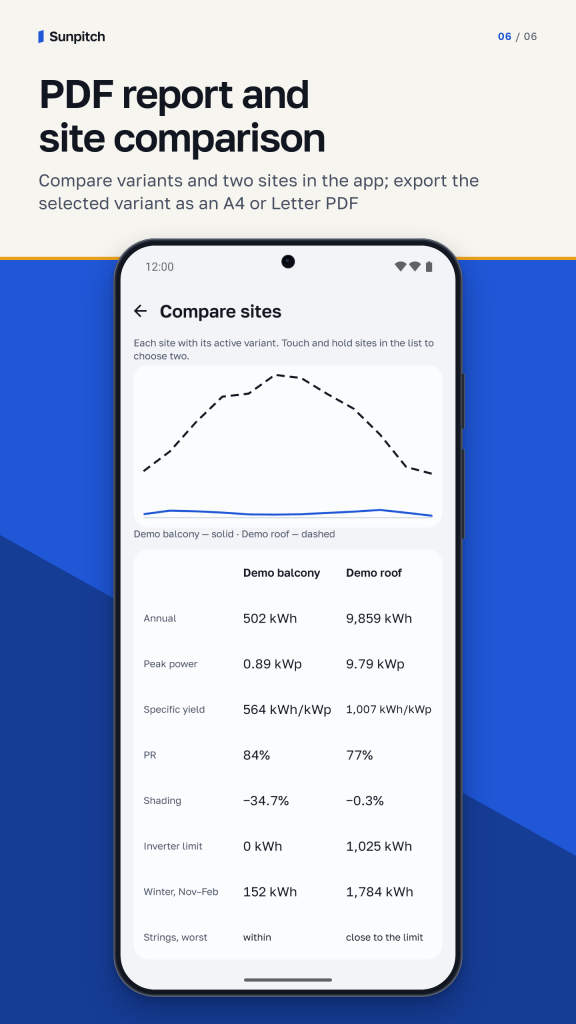
Compare and share
The solar panel planner puts variants A, B and C side by side: railing 90° or 30°, two modules or four on an 800 VA microinverter, south or east-west. Compare two sites too. Export a PDF in A4 or Letter, print it, or export JSON and hourly CSV.
Data and privacy
Uses free public solar data from PVGIS (European Commission, JRC). Loaded site data can be used offline; this is a typical-year estimate, not a weather forecast. Projects and settings are stored on your phone. Online features send place searches to Open-Meteo and rounded coordinates to public data services. The reference check also sends panel settings and an obstacle-height profile. Services receive your IP address with requests. No projects are sent to Zydeno. 16 languages, dark theme and regional units.
Solar data: PVGIS © European Union, 2001–2026 (JRC). Results adjusted by Sunpitch.
Results are estimates based on public solar and weather data and the values you enter. Real output depends on weather, shading, equipment and installation. Check every value against the datasheets of your modules and inverter.
Free. No ads, no tracking, no account.
Support: [email protected]
Privacy Policy: https://zydeno.com/sunpitch/privacy-android.html
Terms of Use: https://zydeno.com/sunpitch/terms-android.html
/ Notes
Start with a balcony or roof, add the panel and inverter values from their datasheets, and describe the obstacles around the site. Compare orientations and variants before inspecting monthly yield, the hourly profile and the losses behind the yearly estimate.
Read the shade together with the yield
The sun-path view places the monthly arcs against your skyline. The tilt-and-azimuth map helps compare another orientation, while the string check compares the electrical values you enter. Reports can be exported as PDF, JSON or hourly CSV for your own planning records.
These are typical-year estimates based on public data and your inputs, rather than a weather forecast or a promise of output. Check module and inverter datasheets and use a qualified electrician for installation and connections. The app’s numerical string check does not approve an installation.
Available for Android on Google Play. The six English Android screens include clearly labelled demonstration sites. Loaded site data can be used offline; online place searches and data requests contact the public services described in the Privacy Policy. Projects and settings remain on your phone, and no account is required.
Contact support · Privacy Policy for Android · Terms of Use for Android
// GET THE APP